
AssertionHub vs ObservePoint: In-depth comparison
- AssertionHub focuses on analytics event payload validation. ObservePoint focuses on tag auditing and large-scale site crawling.
- AssertionHub validates GA4, Meta, Adobe Web SDK, and Google Ads parameter values without any coding.
- ObservePoint's strength is crawling hundreds of pages for tag governance and compliance across a large site.
- AssertionHub includes built-in consent mode validation out of the box. ObservePoint requires custom rule configuration.
How is AssertionHub different from ObservePoint?
AssertionHub and ObservePoint solve the same core problem: broken analytics tracking costs you money and trust (looking at you fake GDPR-compliant websites). But they approach it from very different angles, and at very different price points.
AssertionHub is purpose-built for validating the Analytics and Marketing with a highly customised level of detail. You can also validate all the dataLayer.push events detected along with GA4, Meta, Google Ads, Adobe Web SDK and others.
It validates not just whether events fire, how many times and with what specific metrics, but you also get what Google consent state they fired under . It allows you to record User Journeys through a recorder and it generates tests automatically from what it captures.
There is a permanent free tier with full product access (1 domain, unlimited events validated, 50 credits — no credit card, no time limit). Paid plans start at €49/month (Freelancer Plan), with the Agency Plan at €179/month and Enterprise at custom pricing.
ObservePoint is an enterprise digital governance platform. It crawls your entire website, auditing every tag it finds across thousands of pages. It’s built for large organizations with compliance requirements, dedicated analytics engineering teams with coding knowledge, and a need for full martech stack visibility. While you have some free capabilities, pricing gets prohibitive when you start looking at their “Journeys” feature. for 1500 journeys per you will end up paying 2500$ only for that (as per 2/2/2026) while with Assertionhub that amount of journey and more is included in our premium plan at 179 Eur per month.
We’re going know to see a in-depth comparison on how the main features across the tools compare.
1. Record a User Journey.
Assertionhub
Recording Capabilities
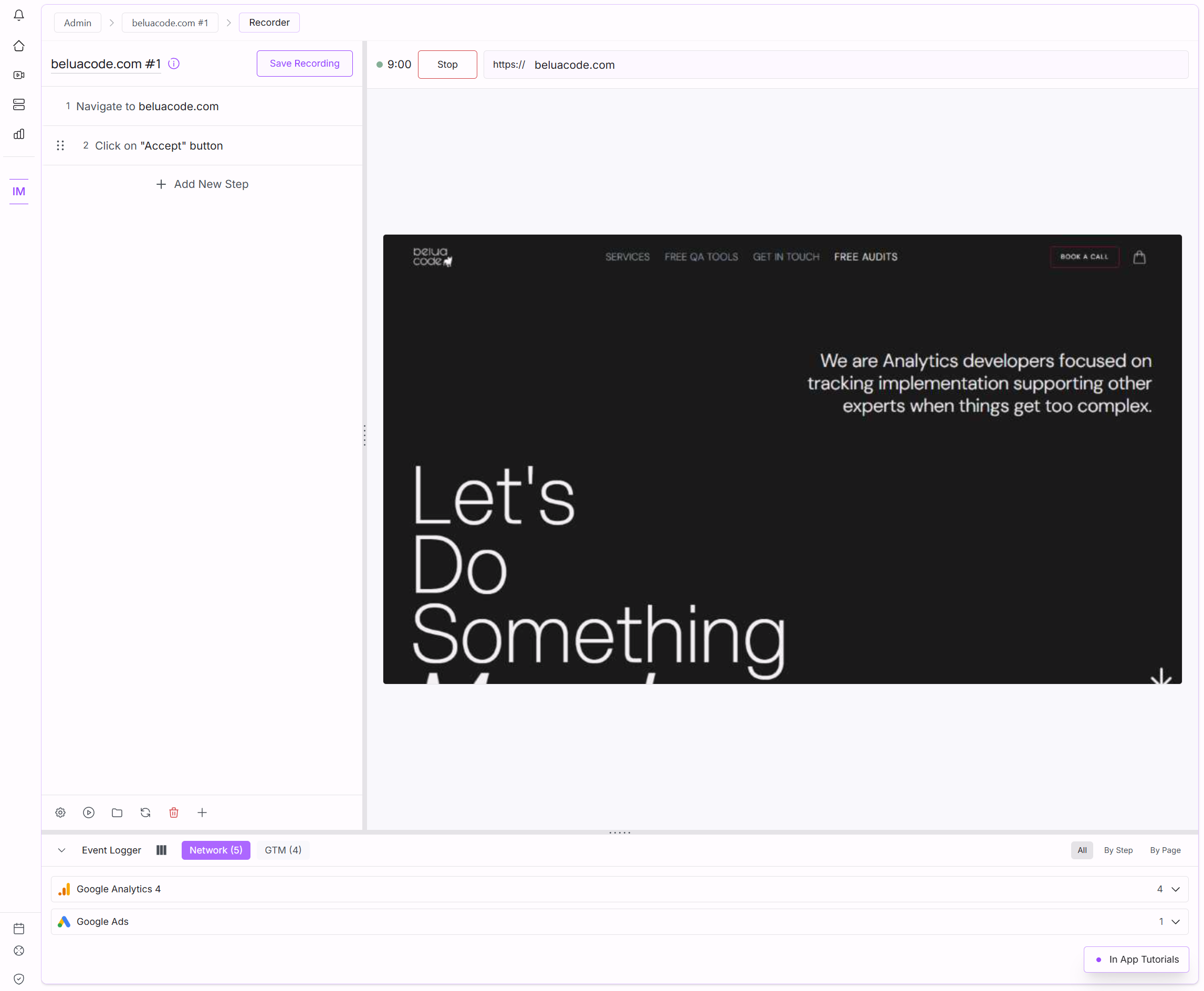
AssertionHub has a built-in recorder where you simply add your website and navigate it as you’d normally do. Each interaction is recorded and added to the Step List on the left. There are usually a couple of unique selectors detected and coordinates for complex elements or specific SPAs quirks ( popups, iframes, consent popup banners, etc…) You can replay your recording with one click and observe in real-time while it replays to spot any issue with the detected or added selectors. (with Observepoint, you only see the final result) . You can also describe in plain text what you want to click ( e.g. add to cart first product ) and during the replay or executions the AI will choose the best selector to achieve what you prompted.
Maintenance and self-resilience
With Assertionhub, During the User Journey Replays and normal executions, we have an AI fallback that comes into play when the step fails because of changes in the HTML. This will generate an alternative for you and you can decide to add it or not. This greatly reduces the maintenance time comparing to always figuring out the error and the new selectors yourselves.
Coding knowledge needed
While it’s not needed, We still suggest you get a little bit of knowledge around HTML and CSS to at least validate more stubborn elements.
Observepoint
Coding knowledge needed
With Observepoint, to record a simple “Journey” (e.g. add a product to cart) you need to know your way around the DOM, at least HTML and CSS.
You need to write some Javascript is needed to address more complex navigations in SPAs like React, Angular and other custom JS Frameworks.
Recording Capabilities
with Observepoint the “Journey” creation is completely manual and with no clue that the selectors and the code you’re adding will work. To test that, you need to replay the “Journey” which will take some time ( up to 10 minutes. Per their docs 2/2/2026 ) and when you need to create a journey for an ecommerce you will need on average 40-60 steps to test and validate which may take a lot of time between figuring out selectors, running replays, etc…
Maintenance and self-resilience
If the HTML changes, as you know, you need to adjust manually the selectors then it requires some time to go again in the HTML and figure out the new selector or new steps to add. There is no self-healing capabilities or AI-fallbacks if the selector or the code you added failed
2. Test creation
Observepoint
To create a test with Observepoint, you can either use a manual approach if you know by heart your analytics and marketing event parameters or you need to at least run the “Journey” once. This will give you an overview of the events detected from which you can create a test to use in the Journey recorded before to validate the various GA4, Meta, etc…
Assertionhub
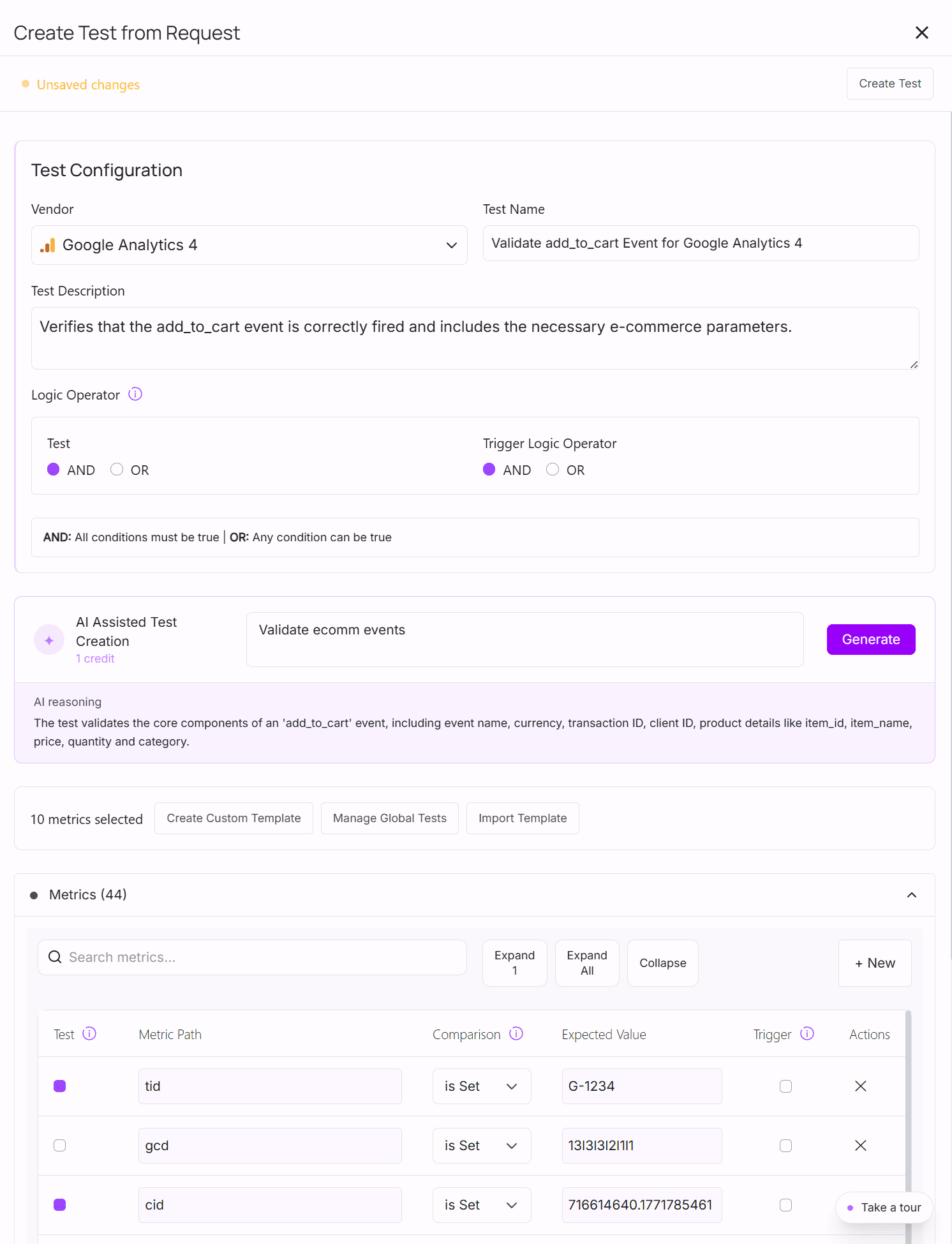
With Assertionhub, while you use the recorder, on the right side, you will see the detected events and data layer push divided by step, by page and all together. From here you can create a test simply clicking on the event. We suggest to give a try to our AI functionalities that allows you ask an AI to select the metrics for you. Always double-check but this, together with our bulk change feature, will save you a fairly amount of time when creating tests
3. Analytics Validations
Assertionhub
With Assertionhub, along with custom tests for your events and Data Layer pushes, you also have a built-in library of validations for the most common issues for GA4, Meta, Google Ads, etc.. E.g. Is GA4 Purchase event missing any mandatory metric? Included in the built-in tests, you also have duplicate detections for events. Both libraries are continuously updated, especially fast if on request.
Consent Mode
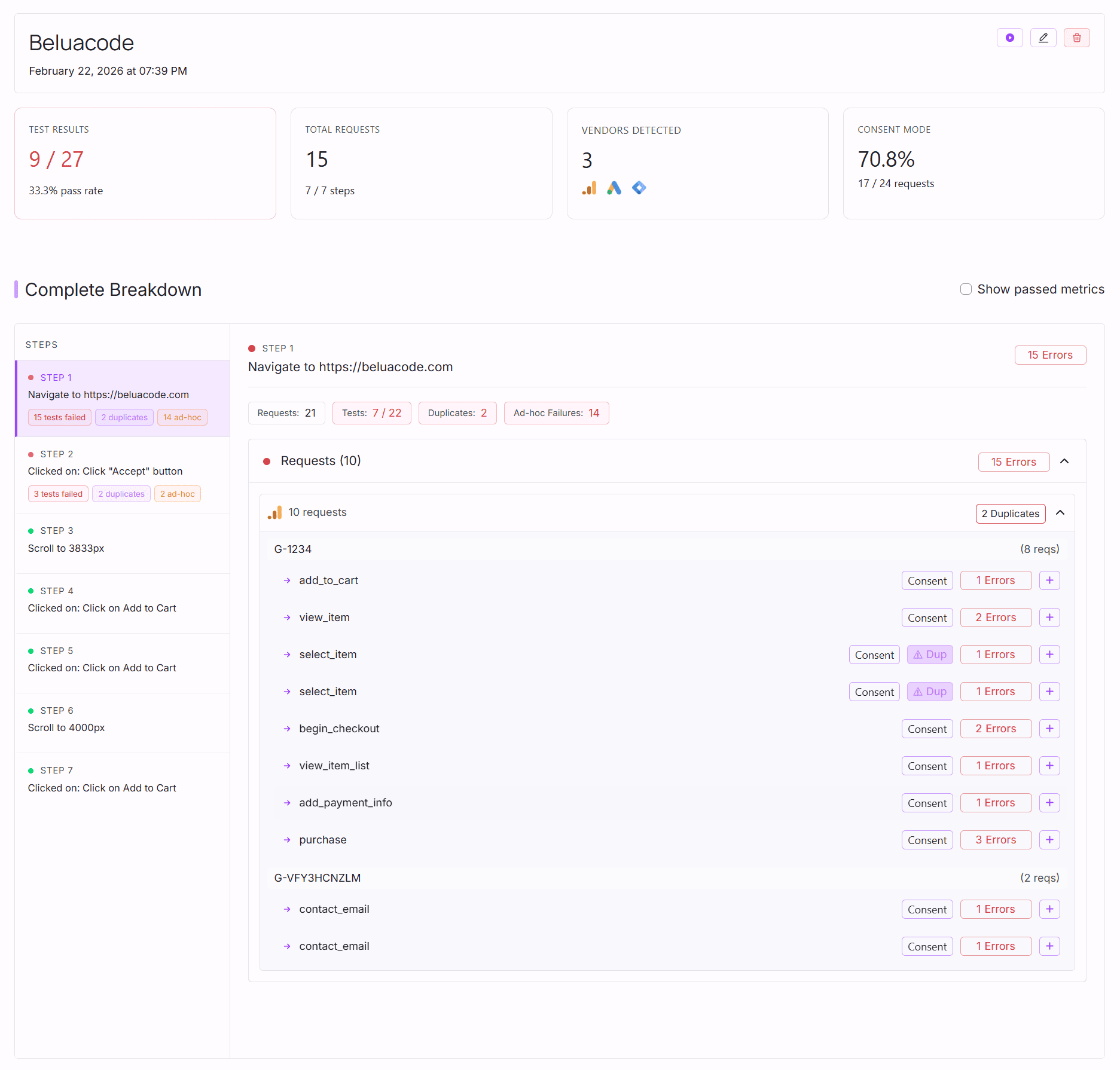
With Assertionhub, you also have Google Consent mode detected on each request or data layer push. So that you know if each event is compliant. While Observepoint offers a more overarching view on the GDPR compliance, you will not have as detailed information about the Consent Mode as with AssertionHub.
Observepoint
With Observepoint, you need to manually create tests for parameters to check, or duplicate detections and other common validations, you have built-in in Assertionhub.
Which should you choose?
Choose AssertionHub if:
- You primarily need to validate that your analytics events (GA4, Meta Pixel, Google Ads, Bing, Pinterest, Adobe Web SDK) fire correctly with the right parameters
- You need to validate Google consent mode: verifying that events fire (or don’t fire) with the correct consent state at the individual event level
- You want no-code setup that non-technical team members can manage and maintain
- You need fast setup (minutes, not weeks)
- You want AI-assisted recording that recovers from selector failures automatically
- You want a budget-friendly automated tests for analytics, marketing and Data Layer Push
Choose ObservePoint if:
- You need to audit tags across thousands of pages on large enterprise sites
- Privacy compliance auditing at scale (GDPR, CCPA cookie scanning across your full site) is a primary requirement
- You need to detect unauthorized cookies across your entire martech stack
- You have a dedicated analytics engineering team with technical resources
- Your organization requires enterprise-grade SLAs, SSO
- Budget and time is not a primary constraint
Get Started with AssertionHub
Get started for free. No credit card required. Record your first user journey, define assertions on your GA4, Meta, Google Ads events, Data Layer Push etc… and see test results in minutes.
Frequently Asked Questions
Can AssertionHub replace ObservePoint?
Does AssertionHub validate consent mode?
Do I need to remember event names and parameter keys to set up tests?
Does ObservePoint validate dataLayer event parameters?
Do I need technical knowledge to use AssertionHub?
What happens when a recorded selector breaks because the site changed?
Which tool is better for agencies managing multiple clients?
Does ObservePoint work with GA4, Meta Pixel, and other platforms?

Co-founder of BeluaCode and AssertionHub
Analytics Developer specialised in tracking implementation,
implementations QA, tag management and highly customised solutions
when standard tools don't fit.
Runs
BeluaCode
as an implementation agency helping other experts when things get
too complex and
AssertionHub
to automate tracking validation on Analytics events.