
Find GA4 and GTM Tracking Errors Automatically: Chrome Extension Validation
- Most GA4 and GTM tracking errors produce no browser error, no failed request, and no visible warning. They only show up as wrong data.
- Built-in checks run automatically on every page you browse with AH Debugger active. No rules, no configuration.
- Checks cover missing transaction_id on purchase, absent gcs consent signal, duplicate event detection, and Measurement ID format.
- Findings are flagged by severity in the DevTools panel so you can prioritize what to fix first.
What are Built-in Checks
Most GA4 and GTM tracking errors produce no visible warning in the browser. A purchase event fires successfully as far as the network is concerned, but it is missing transaction_id, so GA4 treats every purchase as a duplicate and revenue data is wrong. Consent Mode looks active in GTM Preview mode, but the gcs parameter is absent from every GA4 hit. The Measurement ID has a typo that sends data to a non-existent property. None of these appear as errors anywhere you would naturally look.
AH Debugger is a free Chrome extension that catches these issues automatically. Install it from the Chrome Web Store, toggle it on, and browse your site as normal. The built-in checks run in the background against every request that fires and surface any issues directly in the DevTools panel, flagged by severity, with no configuration, no test scripts, and no rules to write.
Current checks
Consent Mode signal presence
Verifies that the gcs parameter is present on GA4 hits. This parameter carries the Consent Mode signal and confirms that Consent Mode is active and communicating the user’s consent state to Google’s measurement infrastructure. If it is absent, your Consent Mode implementation may not be working correctly even if the consent banner appears to function normally.
Measurement ID format
Validates that the tid parameter on GA4 hits follows the expected G- prefix format. An incorrect or malformed Measurement ID means requests are being sent to a non-existent or wrong property, resulting in silent data loss. This check catches copy-paste errors and configuration mistakes that would otherwise go unnoticed.
Ecommerce items array
Flags ecommerce events including add_to_cart, purchase, view_item, begin_checkout, and remove_from_cart that are missing a populated items array. GA4 ecommerce reports depend on this array being present and correctly structured. Without it, items-level reporting is empty regardless of whether the event itself fires.
Purchase event completeness
Checks that purchase events include all three required parameters: transaction_id, value, and currency. A purchase event missing any of these is incomplete in GA4’s ecommerce reporting. Missing transaction_id in particular causes GA4 to treat duplicate purchases as separate transactions, inflating revenue figures.
We are actively expanding the built-in check library based on user feedback.
How to read the results
Open the DevTools panel by right-clicking any page, selecting Inspect, clicking the double arrow icon in the top right of DevTools, and choosing AH Debugger from the dropdown.
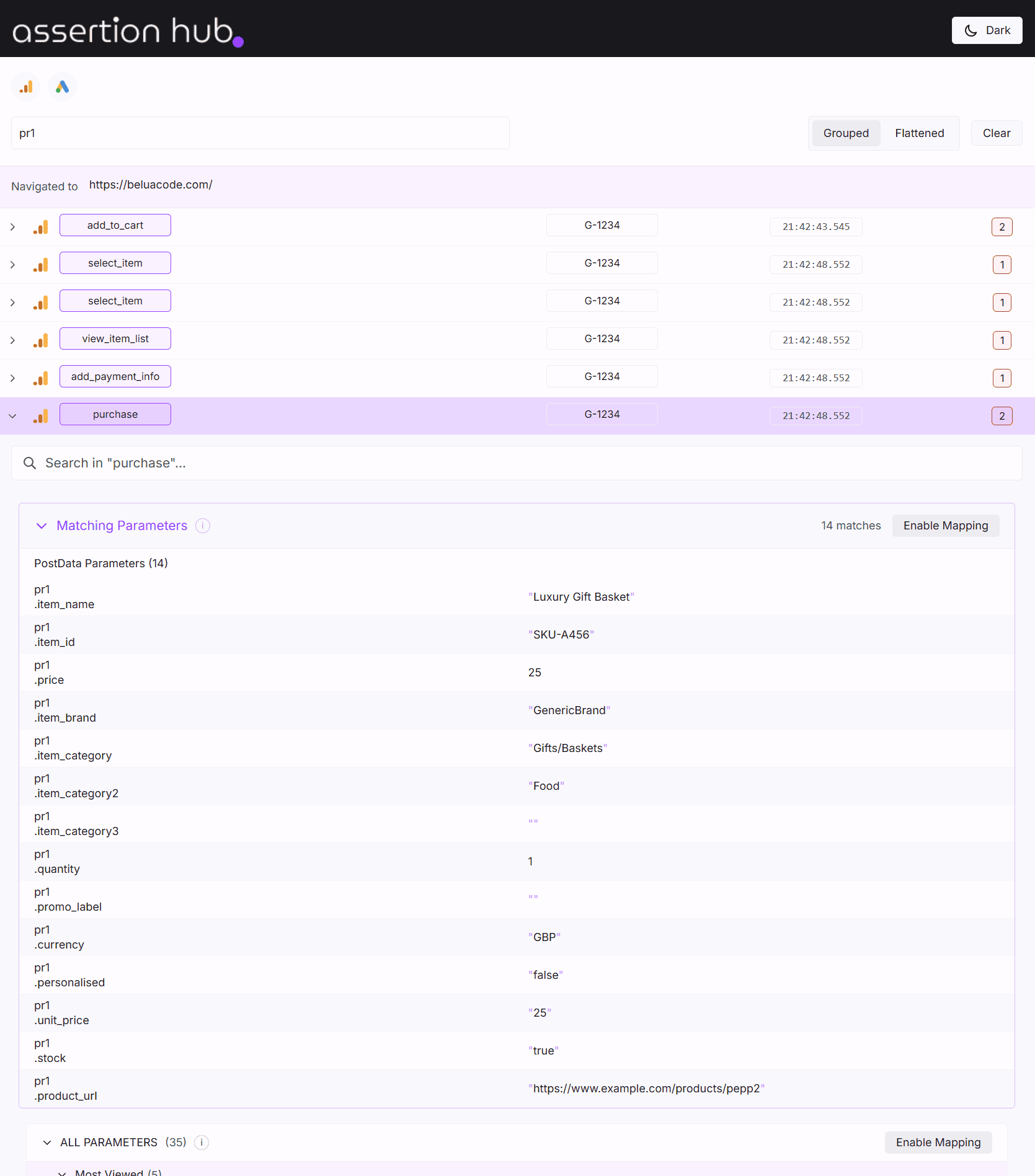
Navigate to the Built-in Checks tab within the panel. Results populate after you have browsed the page and collected some requests. Each check shows:
- Pass or fail status: whether the check found any issues in your session data
- Severity level: errors indicate issues that will definitely cause data loss or incorrect reporting. Warnings flag patterns worth reviewing that may or may not be intentional
- Details: for failed checks, the specific requests or parameters that triggered the issue
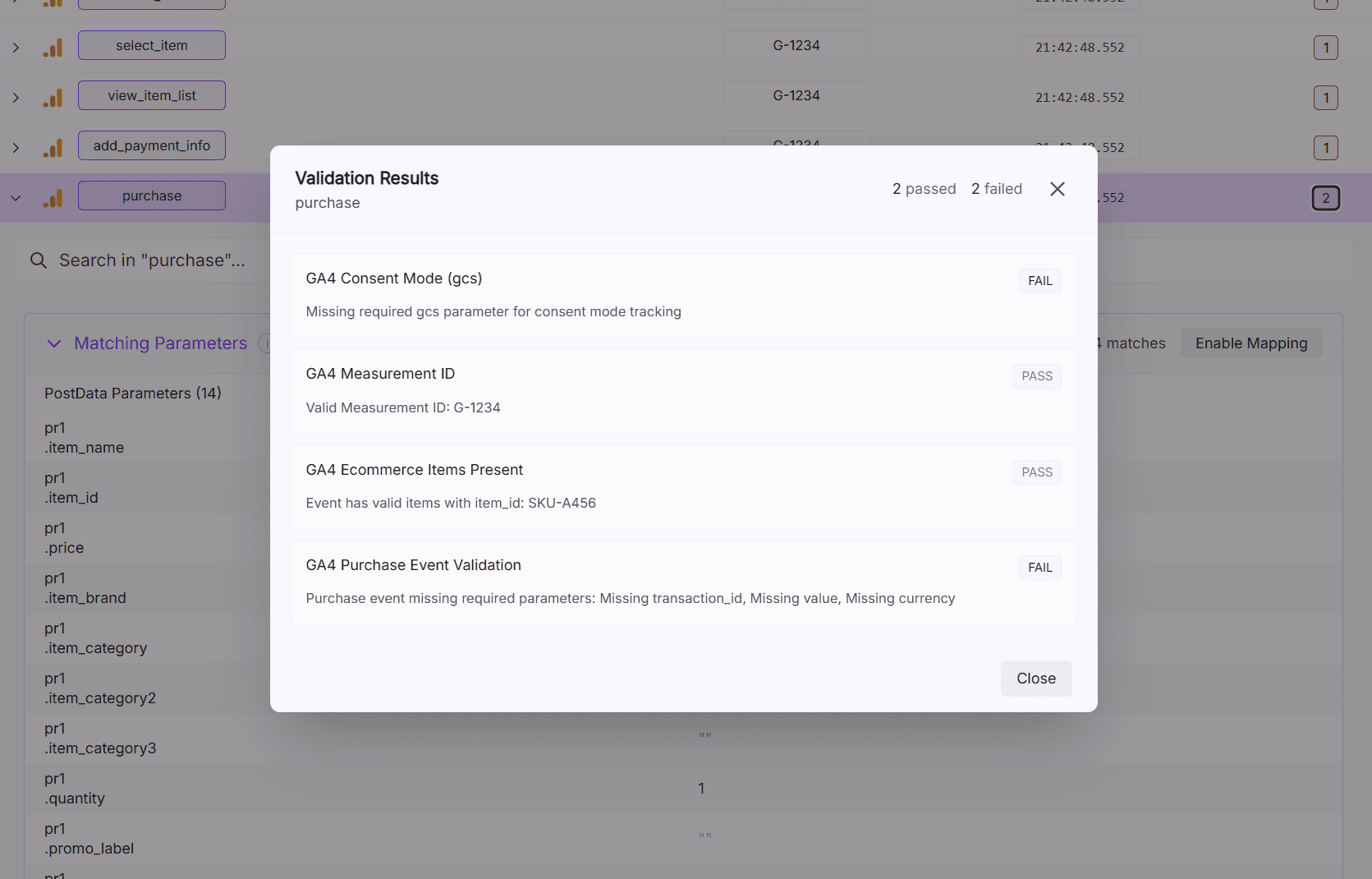
Ready to explore more of AH Debugger? Read What is AH Debugger →
Frequently Asked Questions
How do I check if my GA4 implementation is correct?
How do I find GTM and GA4 tracking errors automatically?
Why is my GA4 purchase event missing transaction_id?
How do I know if the Consent Mode gcs parameter is present on GA4 hits?
Is there a free tool that validates GA4 events without writing tests?

Co-founder of BeluaCode and AssertionHub
Analytics Developer specialised in tracking implementation,
implementations QA, tag management and highly customised solutions
when standard tools don't fit.
Runs
BeluaCode
as an implementation agency helping other experts when things get
too complex and
AssertionHub
to automate tracking validation on Analytics events.